UX/UI Design

Redesign

Discord

Redesigning the login and register form to increase and support accessibility.
Timeline

Timeline

March 2024

March 2024

Industry

Industry

Communication

Communication

Tools

Tools

Figma

Figma

Role

Role

UX/UI Designer
UX/UI Designer

Interaction Design, Visual Design, Prototyping

Interaction Design, Visual Design, Prototyping

Overview

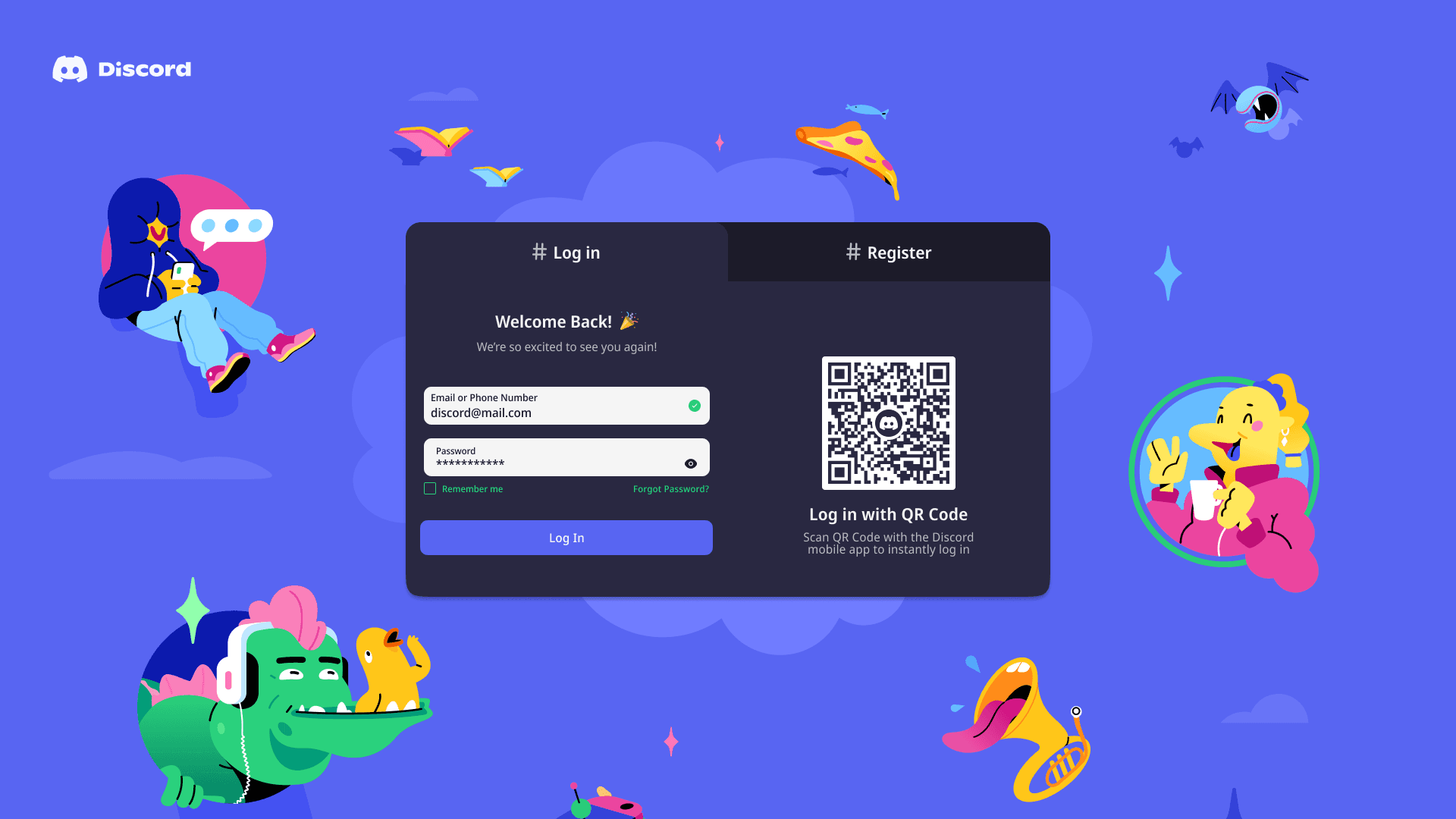
As a practice exercise, I redesigned the signup and login form for the ever-growing communication platform, Discord. As an aspiring UX/UI designer, it was a valuable experience to test my Figma skills and receive feedback from experienced UX/UI designers and product designers.

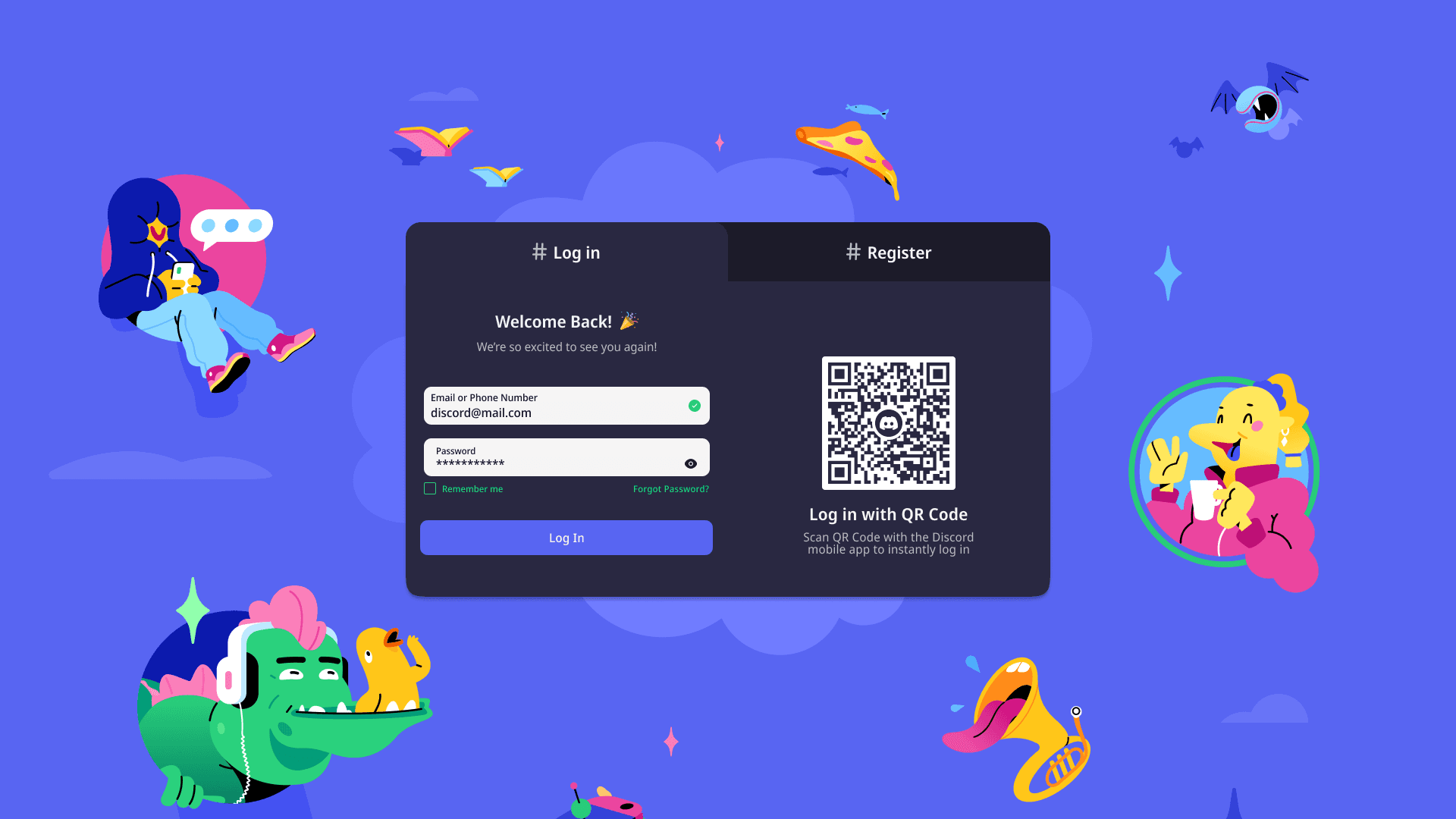
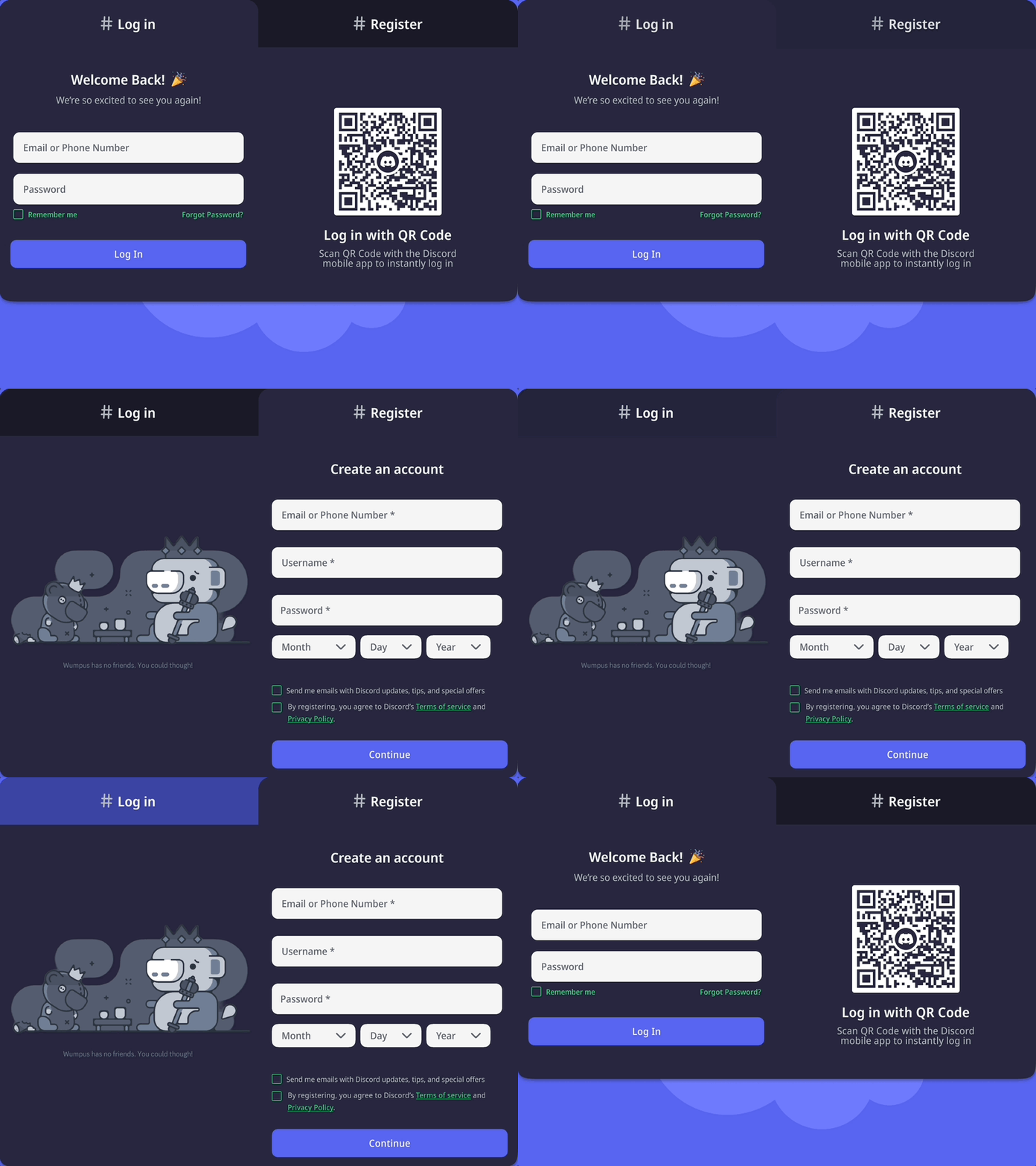
While redesigning the signup/login page, my goal was to reflect the overall vibe of Discord while ensuring it complied with WCAG and accessibility. The updated color scheme incorporates hues from Discord's website, while the emoji in the login section reinforces Discord's playful branding. Additionally, since hashtags are used to differentiate channels within Discord, I found it was fitting to treat the login and register tabs as their own 'channels'.

Overview

As a practice exercise, I redesigned the signup and login form for the ever-growing communication platform, Discord. As an aspiring UX/UI designer, it was a valuable experience to test my Figma skills and receive feedback from experienced UX/UI designers and product designers.

While redesigning the signup/login page, my goal was to reflect the overall vibe of Discord while ensuring it complied with WCAG and accessibility. The updated color scheme incorporates hues from Discord's website, while the emoji in the login section reinforces Discord's playful branding. Additionally, since hashtags are used to differentiate channels within Discord, I found it was fitting to treat the login and register tabs as their own 'channels'.

Thank you!

Want to see more? Explore my other projects :)

Want to see more? Explore my other projects :)

Want to see more? Explore my other projects :)

The Redesign Process

Research

For the redesigning challenge, I chose Discord's signup and login form. Before this challenge, I had an idea of the WCAG and accessibility standards, so I thought it would be a good idea to choose a platform I'm familiar with. I asked the people around me about some complaints they may have with the signup/login form. This required them to go through the process of registering or logging in.
Problem

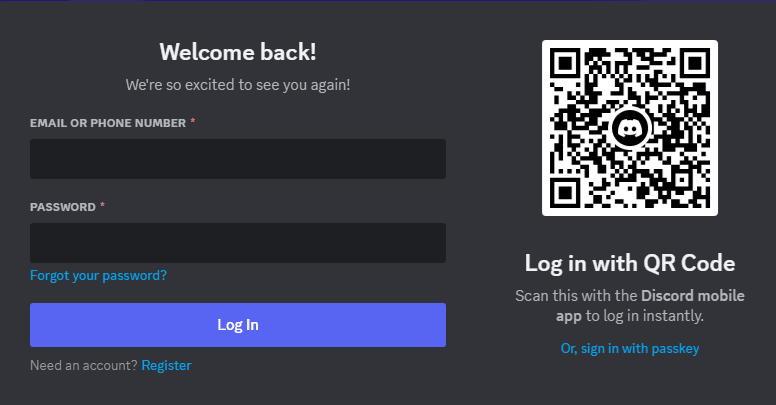
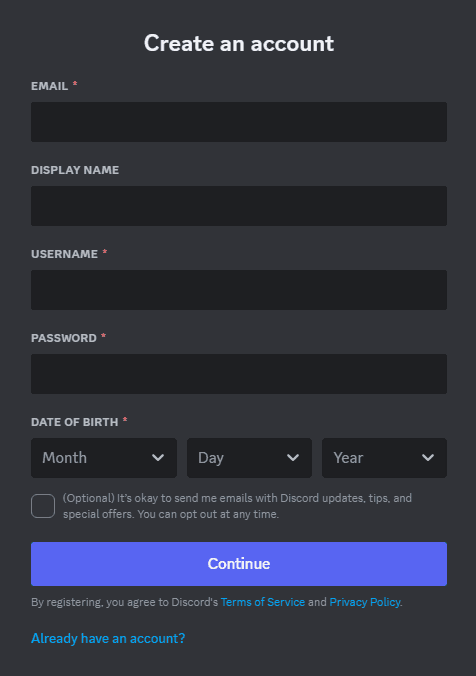
I began analyzing the signup form and identifying what needed improvement. Afterwards, I started going through the guidelines to determine areas of improvement, as well as the feedback I got from my peers. There were four prominent problems I noticed with the current version of the login and register form.

No password requirement prompt

Passwords are always hidden

Passwords are always hidden

Passwords are always hidden

Text color does not meet contrast ratio

Text color does not meet contrast ratio

Text color does not meet contrast ratio

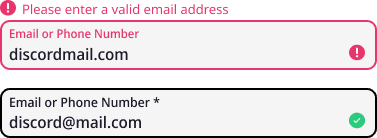
Ambiguous login error

Ambiguous login error

Ambiguous login error

Solutions

Solutions

Solutions

Based on the pain point identified by my peers and insights from my research, I brainstormed potential solutions.
01

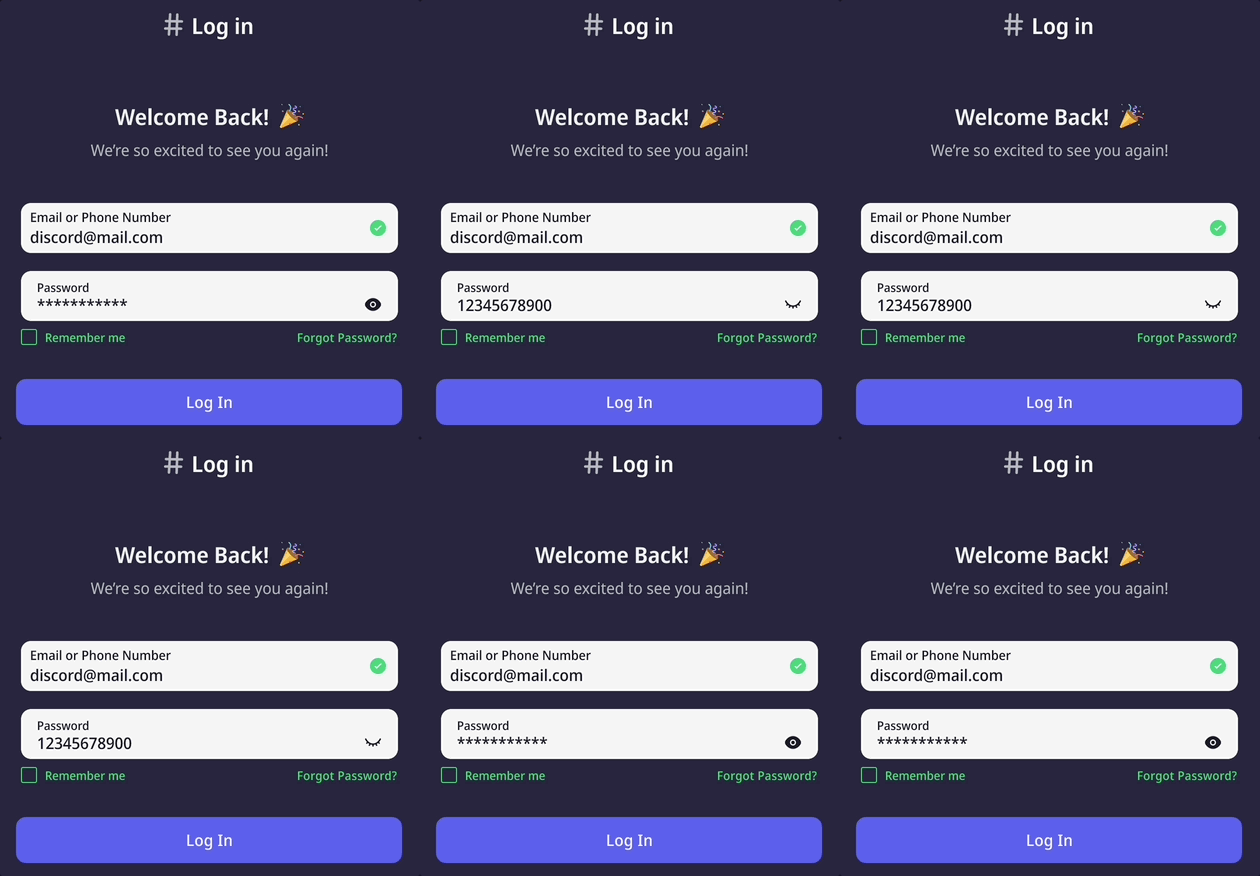
Hide/Show Passwords

Implementing a hidden/ view password option enhances security and user convenience.

02

Tabs

To improve accessibility, I converted the forms into tabs, allowing users to switch between forms seamlessly.

03

Password Security

The inclusion of a password requirement and real-time validation promotes security, simultaneously providing subtle hints to users who may have forgotten their passwords.

04

Playful and User-Friendly Environment

By incorporating emojis, high-contrast colors and enhanced CTA buttons, the redesign creates a playful atmosphere. These changes also cater to a broader audience while aligning with the inclusive WCAG standards.

01

Hide/Show Passwords

Implementing a hidden/ view password option enhances security and user convenience.

02

Tabs

To improve accessibility, I converted the forms into tabs, allowing users to switch between forms seamlessly.

03

Password Security

The inclusion of a password requirement and real-time validation promotes security, simultaneously providing subtle hints to users who may have forgotten their passwords.

04

Playful and User-Friendly Environment

By incorporating emojis, high-contrast colors and enhanced CTA buttons, the redesign creates a playful atmosphere. These changes also cater to a broader audience while aligning with the inclusive WCAG standards.

01

Hide/Show Passwords

Implementing a hidden/ view password option enhances security and user convenience.

02

Tabs

To improve accessibility, I converted the forms into tabs, allowing users to switch between forms seamlessly.

03

Password Security

The inclusion of a password requirement and real-time validation promotes security, simultaneously providing subtle hints to users who may have forgotten their passwords.

04

Playful and User-Friendly Environment

By incorporating emojis, high-contrast colors and enhanced CTA buttons, the redesign creates a playful atmosphere. These changes also cater to a broader audience while aligning with the inclusive WCAG standards.

01

Hide/Show Passwords

Implementing a hidden/ view password option enhances security and user convenience.

02

Tabs

To improve accessibility, I converted the forms into tabs, allowing users to switch between forms seamlessly.

03

Password Security

The inclusion of a password requirement and real-time validation promotes security, simultaneously providing subtle hints to users who may have forgotten their passwords.

04

Playful and User-Friendly Environment

By incorporating emojis, high-contrast colors and enhanced CTA buttons, the redesign creates a playful atmosphere. These changes also cater to a broader audience while aligning with the inclusive WCAG standards.

Feedback

I presented my prototype to experienced designers in the field and obtained valuable feedback with the following takeaways:

  • Center feedback icons

  • Darken placeholder text

  • Review font sizes


Align feedback icons

Icons were initially center-aligned to the user input
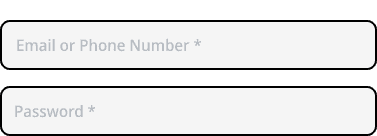
Darken placeholder text

#B5BAC1 was used for placeholder text

Review font sizes

The minimum font size used was 14pt

The final iteration

Login form

Register form

Conclusion

Some challenges I had with this redesign is, with the feedback I received and the knowledge I gained, I was able to update the form. Although I wasn't able to acquire metrics or feedback for the final product, I was able to further my understanding of accessibility and WCAG that I wouldn't otherwise gotten if I didn't get feedback with my first draft.